Automatic Backwash Filter Manual
Table of Contents
Manual Overview
Automatic Backwashing Filter Operation Instructions
1.Description
This controller is specially designed for multi-element automatic backwash filter t, and can be matched with various working conditions and control processes of automatic cleaning filter equipment, with the advantages of low cost, high efficiency, and high reliability.
The controller adopts the current mainstream high-speed CPU chip with a 5-inch full-color touch screen display, which has the characteristics of intuitive display, simple operation, and high degree of visualization. It has a variety of protection and alarm mechanisms, has a pressure sensing function, and the working mode supports time and pressure difference to start cleaning.
2. Input/Output and Power Specifications
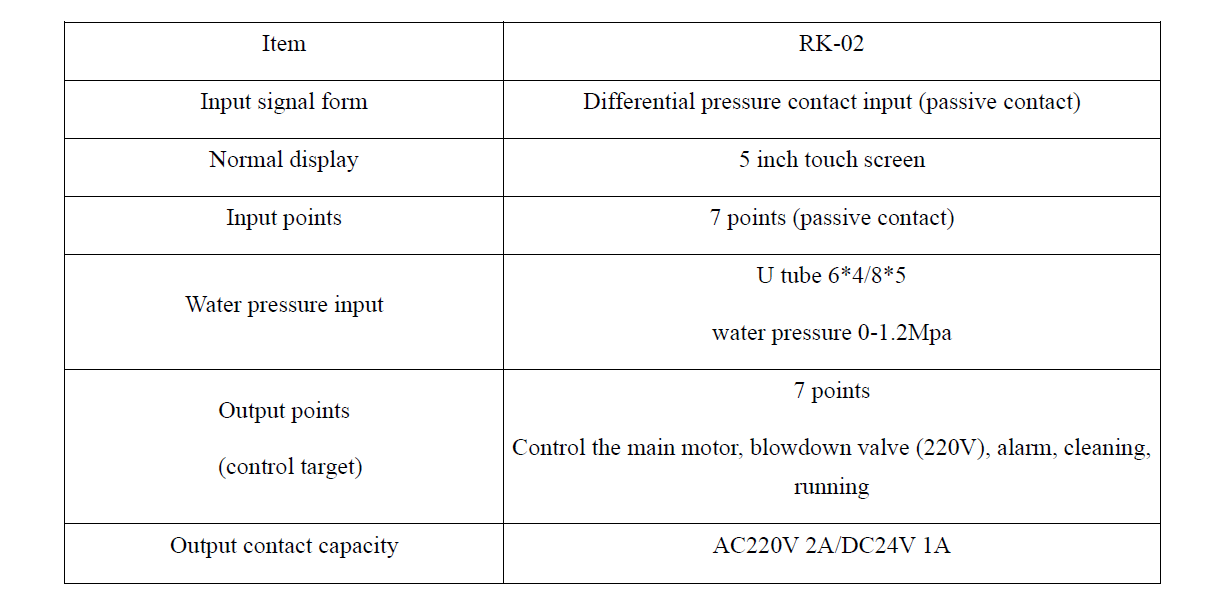
3. Control Processes
- Filtration stage: the motor stops, the drain valve is closed to enter the filtration state and timed.
- Backwash start: When the filter setting time is up or the pressure difference switch detects a continuous pressure difference signal, backwash cleaning will start after the pressure difference delay time.
- Backwash Cleaning stage: the motor starts, after the filter element is detected, open the drain valve to enter the cleaning time. When the cleaning time is up, the next filter element will be detected. After all the filter elements are cleaned, the cleaning cycle is complete. And it will enters into the filtration stage again.
- Alarm trigger:
- Pressure difference delay alarm which meets the condition of the differential pressure switch signal.
- The inlet and outlet water pressure reaches the upper and lower limit alarm conditions.
- The inlet water pressure is lower than the outlet water pressure.
- Any one of the above three conditions will trigger an alarm.
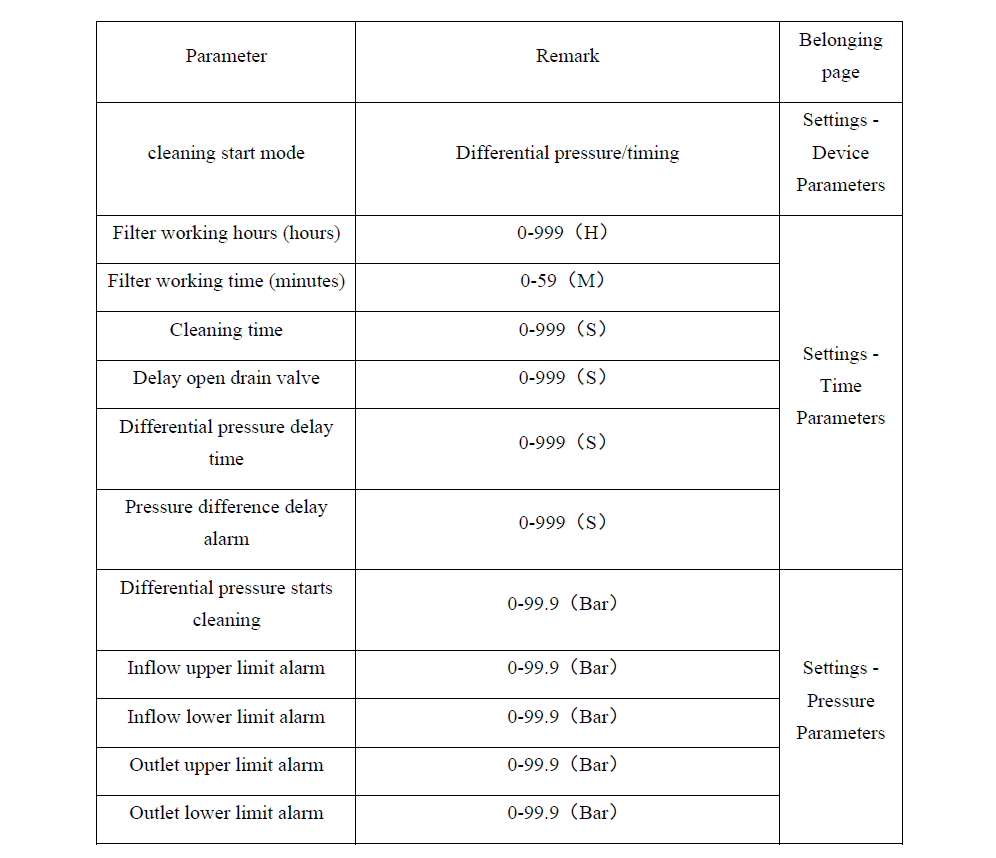
4. Description of function instructions
5. Operation Instructions
Power on into automatic mode
5.1 Automatic Mode
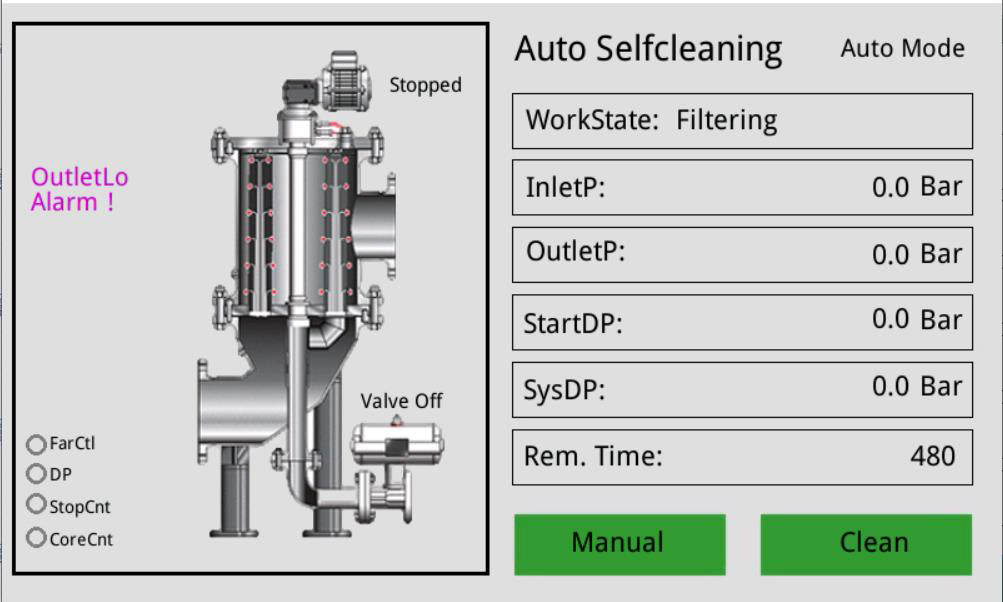 Manual: switch to the manual interface
Cleaning/filtering: perform a cleaning/enter the filtering state
5.2 Manual Mode
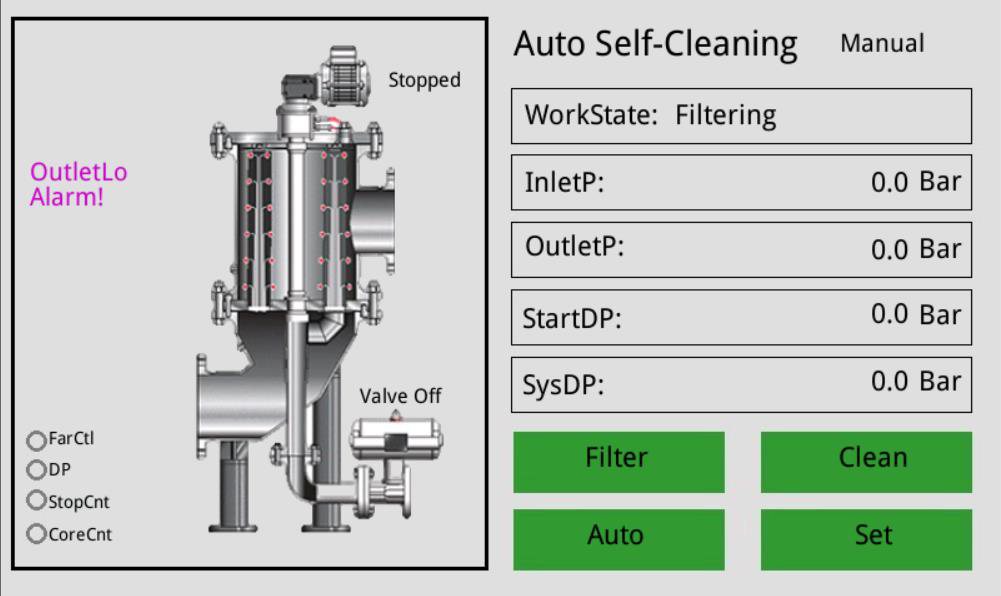 Filter: enter into filtration
Cleaning: Enter backwash cleaning
Automatic: enter the automatic mode interface
Settings: enter the settings interface
5.3 Settings
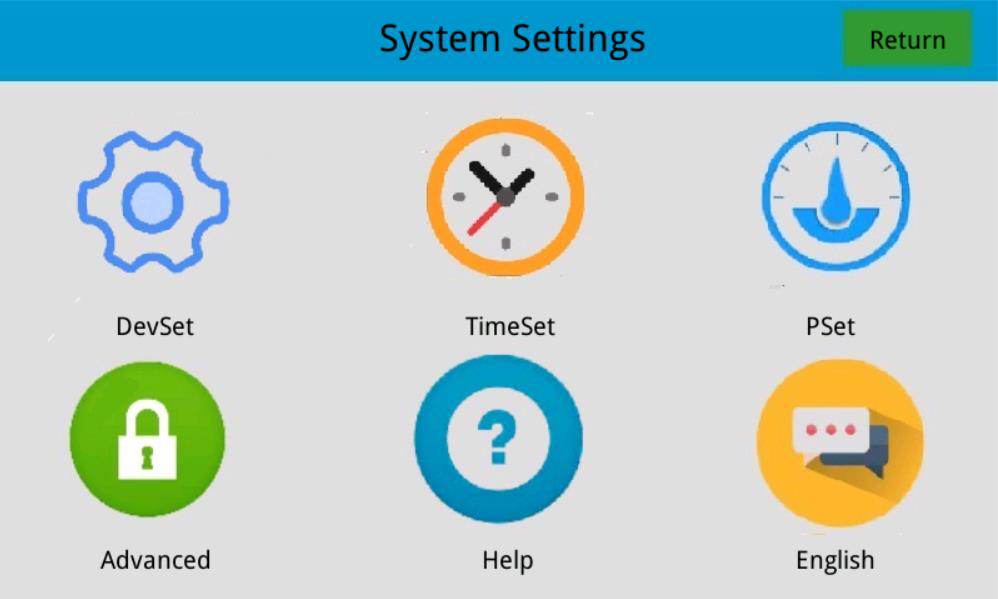
- Device setting: set the startup mode of the device
- Time setting: set the working time of each state of the equipment
- Pressure setting: set the upper and lower limits of the inlet and outlet pressure and the starting value of the pressure difference
- Advanced Options: Advanced parameters of the device
- Help: display the relevant information of the device and the device manufacturer
- Language: Select the display language of the system, currently only supports Chinese and English
5.3.1 Device setting
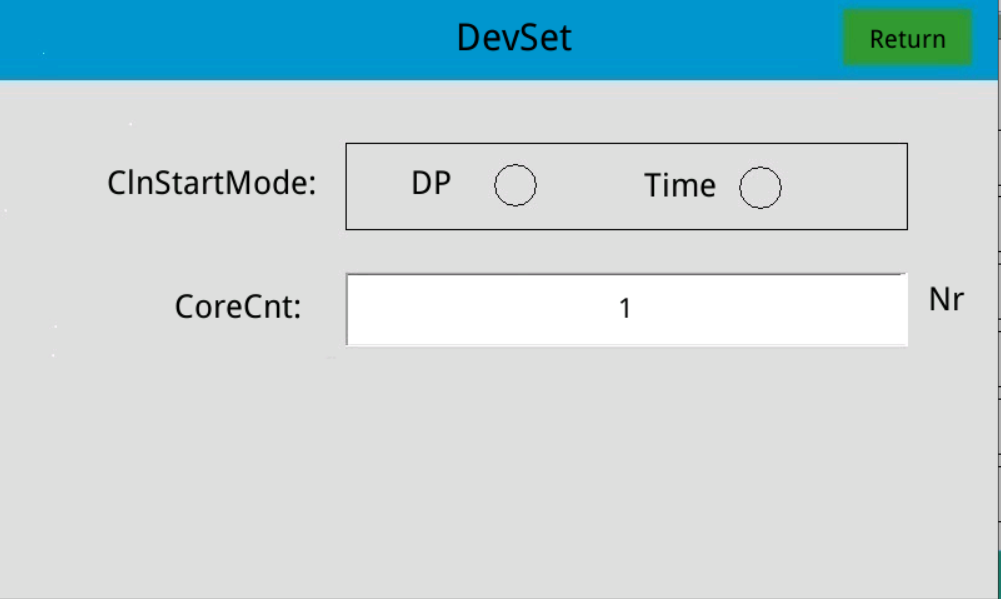 Pressure difference (DP): set the equipment to enter backwashing which enter through pressure difference
Time: Set the equipment to enter backwashing after a period of time of filtration
Number of filter elements: set the number of filters
5.3.2 Time Setting
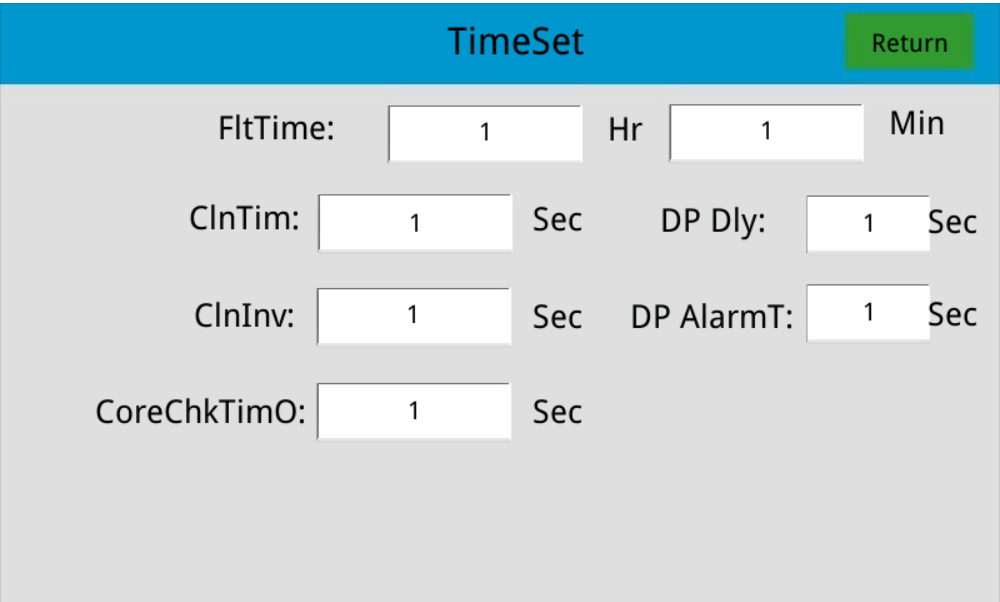
Filtering working time(FitTime): set the regular working time of automatic working filter
Cleaning time(ClnTim): set the cleaning time
Cleaning interval(ClnInv): set the cleaning interval
Pressure difference delay time(DP Dly): set the cleaning delay to enter the cleaning
Pressure difference alarm delay(DP AlarmT): when the set pressure difference reaches the starting value, it will keep alarming for a certain period of time
Filter element detection timeout (CoreChkTimO): set the detection filter element timeout time
5.3.3 Pressure Set
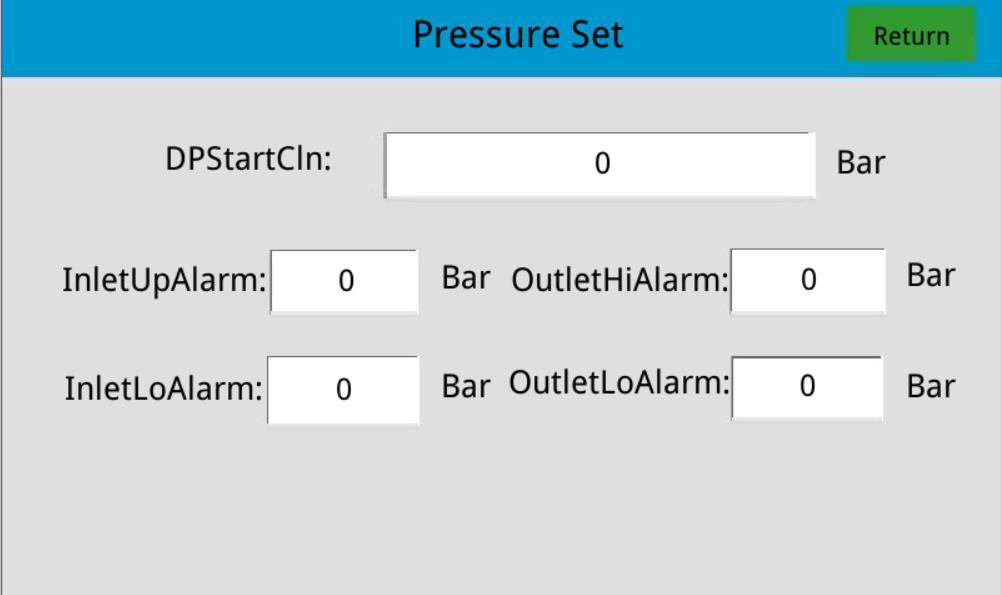 Cleaning start of differential pressure( Set the pressure difference to enter the cleaning.
Inflow upper limit alarm( Set the pressure upper limit alarm value of the inflow.
Inflow lower limit alarm(InletLoAlarm): Set the pressure lower limit alarm value of the inflow.
Outlet upper limit alarm(OutletHiAlarm): Set the pressure upper limit alarm value of the outlet.
Outlet lower limit alarm( Set the pressure lower limit alarm value of the outlet.
5.3.4 Help
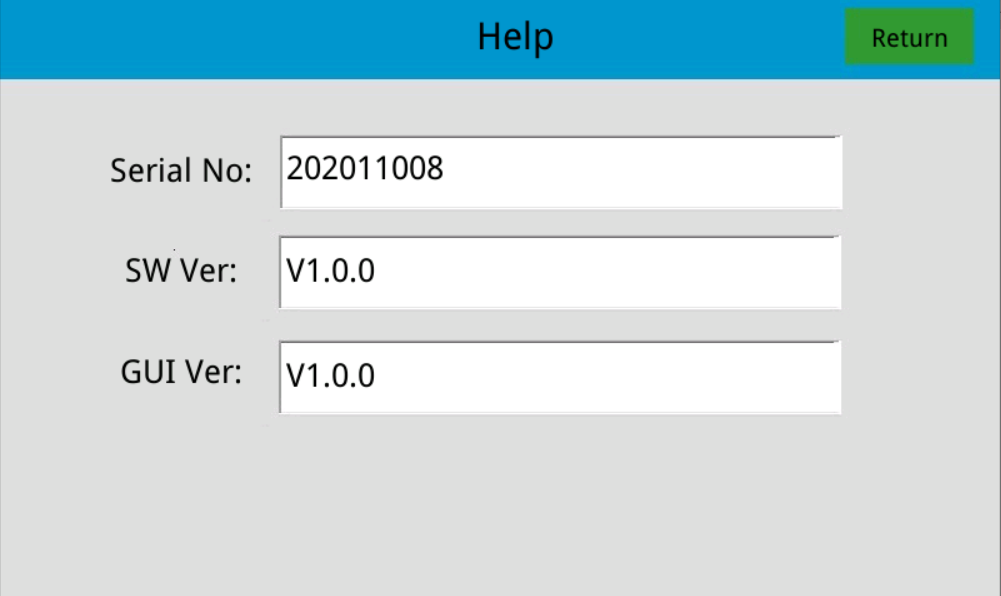 Display information related to the controller.
6.Electrical Specification
As per Appendix
7. Troubleshooting
7.1 Electrical failure
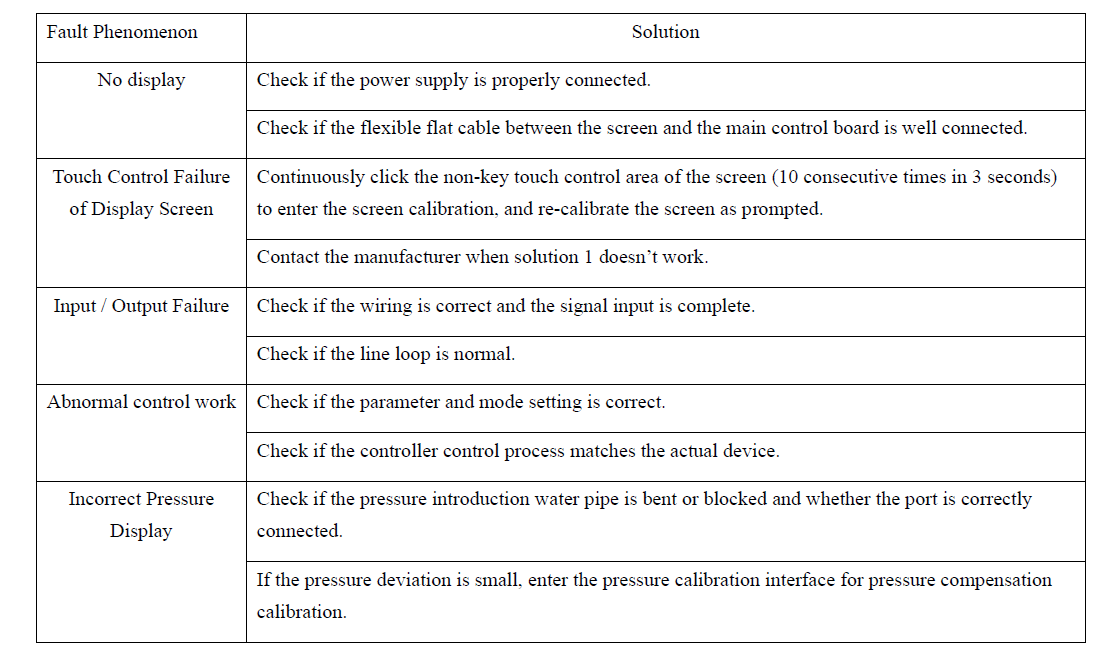
7.2 Alarm failure
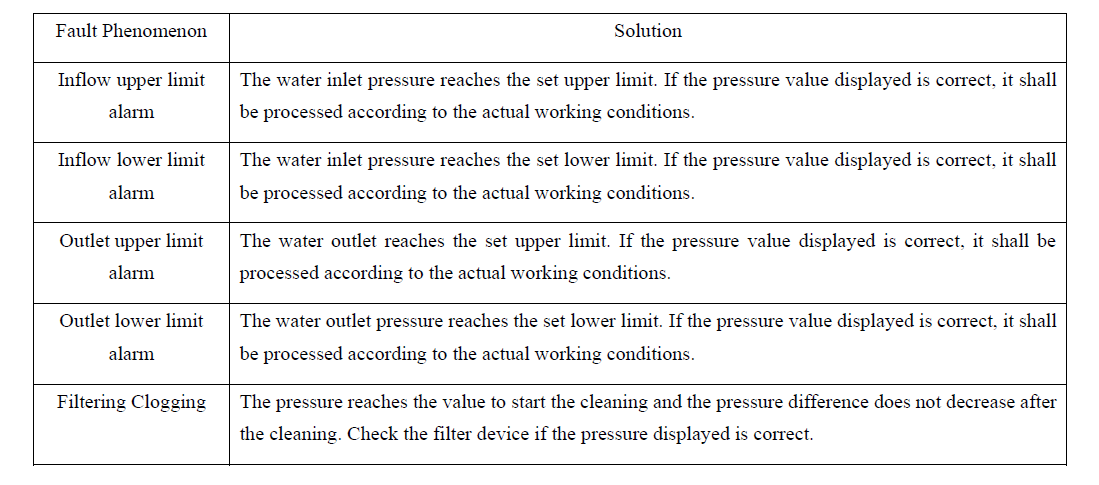
8. Communication Protocol
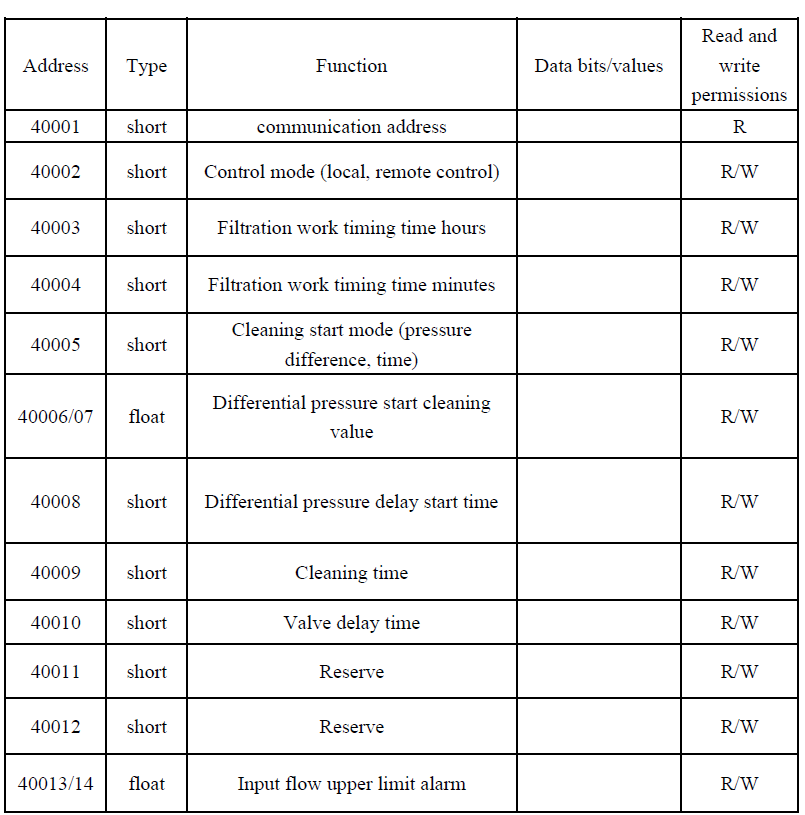
8.1 ModBus
Introduction to ModBus Protocol
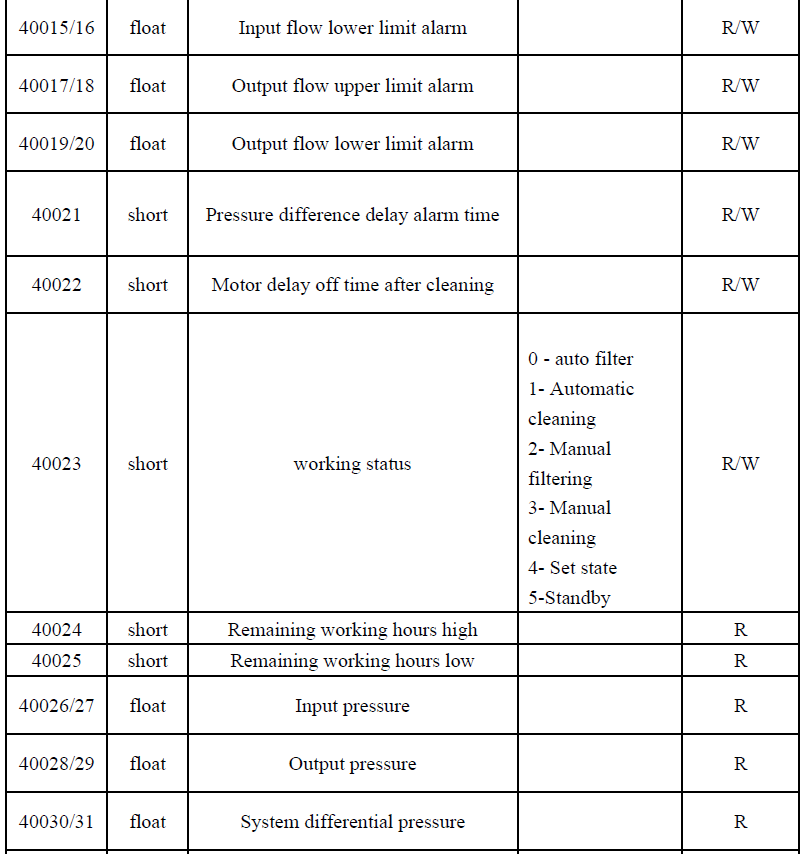
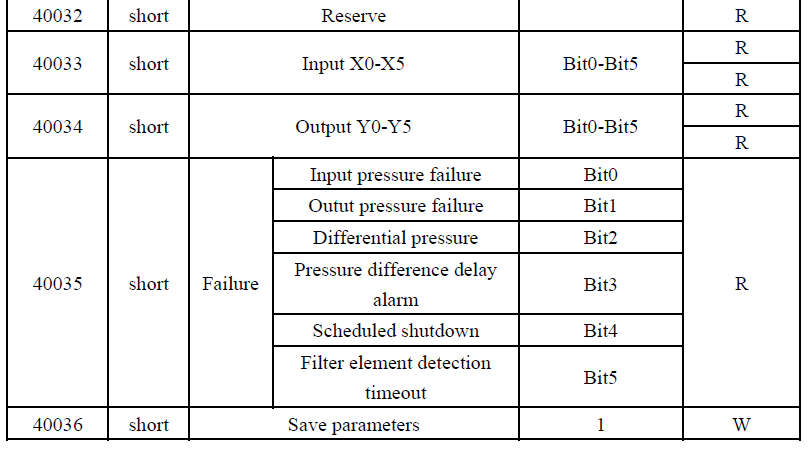
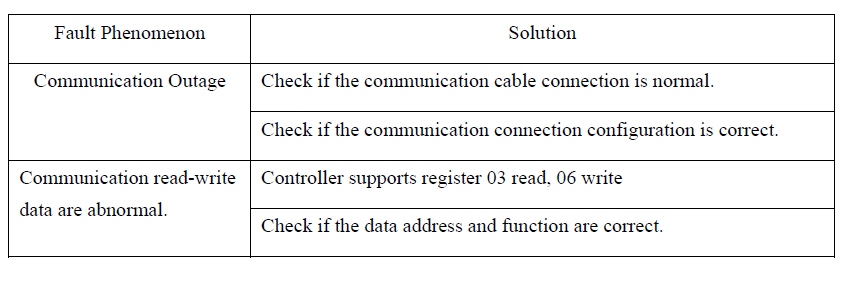
The standard 485 communication and ModBus RTU protocol are adopted for communication and the controller is used as a slave station.
Communication Baud Rate 9600
Data Bit 8
Stop Bit 1
Check Bit NONE
8.2 Parameter communication address list
8.3 Communication Failure
This section provides comprehensive documentation for all products in the Automatic Backwash Filter category. Please select a specific product below to view its detailed manual.
Available Products
Carbon Steel-1400-Automatic Backwash Filter
SS2507-1000-Automatic Backwash Filter
SS2507-500-Automatic Backwash Filter
SS304-950-Automatic Backwash Filter
SS316-950-Automatic Backwash Filter
SS2205-950-Automatic Backwash Filter
SS304-1000-Automatic Backwash Filter
SS316L-1000-Automatic Backwash Filter
SS2205-1000-Automatic Backwash Filter
SS2205-900-Automatic Backwash Filter
SS316-900-Automatic Backwash Filter
SS304-900-Automatic Backwash Filter
SS304-850-Automatic Backwash Filter
SS316-850-Automatic Backwash Filter
SS2205-850-Automatic Backwash Filter
SS2205-800-Automatic Backwash Filter
SS316-800-Automatic Backwash Filter
SS304-800-Automatic Backwash Filter
SS304-750-Automatic Backwash Filter
SS316-750-Automatic Backwash Filter
SS2205-750-Automatic Backwash Filter
SS2205-700-Automatic Backwash Filter
SS316-700-Automatic Backwash Filter
SS304-700-Automatic Backwash Filter
SS304-650-Automatic Backwash Filter
SS316-650-Automatic Backwash Filter
SS2205-650-Automatic Backwash Filter
SS2205-550-Automatic Backwash Filter
SS316-550-Automatic Backwash Filter
SS304-550-Automatic Backwash Filter
SS304-600-Automatic Backwash Filter
SS316-600-Automatic Backwash Filter
SS2205-600-Automatic Backwash Filter
SS2205-500-Automatic Backwash Filter
SS2205-400-Automatic Backwash Filter
SS316-400-Automatic Backwash Filter
SS2205-300-Automatic Backwash Filter
SS316-500-Automatic Backwash Filter
SS304-500-Automatic Backwash Filter
SS2205-450-Automatic Backwash Filter
SS316-450-Automatic Backwash Filter
SS304-450-Automatic Backwash Filter
SS304-400-Automatic Backwash Filter
SS2205-350-Automatic Backwash Filter
SS316-350-Automatic Backwash Filter
SS304-350-Automatic Backwash Filter
SS316L-300-Automatic Backwash Filter
SS304-300-Automatic Backwash Filter
SS304-273-Automatic Backwash Filter
SS2205-1400-Automatic Backwash Filter
Need Help?
If you need additional assistance with any product in this category, please contact our support team.